

Description
Download Ghibli Ghibli Anime Maker – Ghibli art, anime style, selfie to anime, AI art, Studio Ghibli, digital art, Ghibli style, animated portrait, AI selfie, creative tool, artistic transformation, Ghibli-inspired, art app, digital illustration, animated selfie
Overview
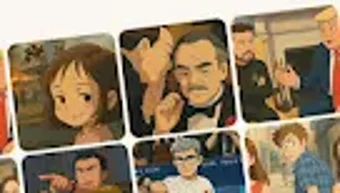
Ghibli: Ghibli Anime Maker is a creative desktop application designed to transform photographs—particularly selfies—into artwork inspired by the iconic animation style of Studio Ghibli. The software enables users to upload or capture a photo and apply AI-driven rendering to produce hand-drawn, animated-style portraits. This tool is ideal for fans of Japanese animation, digital artists, and casual users seeking a fun and expressive way to reimagine personal images. It supports images of individuals, friends, and even pets, broadening its appeal beyond solo portraits. The application aims to simplify the artistic process by automating complex visual transformations, making it accessible to users without formal illustration experience. Its core purpose lies in bridging personal photography with the whimsical, emotionally rich aesthetics of Ghibli films. While the developer did not provide detailed background information, the app’s name and design suggest a focus on creative expression rooted in cinematic artistry. Real-world usage scenarios include sharing stylized portraits on social media, creating personalized digital gifts, or experimenting with visual storytelling. The app is available for free download, enhancing its accessibility across a wide audience.
Key Features & Capabilities
- AI-Powered Art Transformation – Uses advanced artificial intelligence to convert standard photos into hand-drawn, Ghibli-style illustrations. The algorithm analyzes facial features and applies painterly textures and soft shading characteristic of Studio Ghibli’s animation.
- Selfie to Anime Conversion – Allows users to take or upload a selfie and instantly generate an animated portrait that captures the gentle, expressive qualities of Ghibli characters.
- Multi-Subject Support – Works with images of multiple people or pets, enabling collaborative or pet-themed artistic transformations.
- Instant Rendering – Processes images quickly, delivering results in seconds without requiring manual editing or technical expertise.
- Export and Share Functionality – Offers seamless options to save creations locally or share them directly via social media or messaging platforms.
These features are particularly useful for users looking to create unique digital keepsakes, enhance social media content, or explore AI-assisted creativity. The workflow is designed to be intuitive, minimizing steps between photo upload and final output. For digital artists, the app may serve as a starting point for further illustration work. The emphasis on speed and visual fidelity ensures that users can experiment freely without technical barriers. The software’s focus on aesthetic consistency with Studio Ghibli’s visual language suggests a curated set of stylistic parameters, though exact technical details were not specified.
User Interface, Workflow & Performance
The user interface of Ghibli: Ghibli Anime Maker is structured around simplicity and visual appeal. The main screen features a central upload zone, with clear buttons for capturing a photo, selecting from the device’s gallery, and initiating the transformation process. Navigation is minimal, relying on a linear workflow: upload → process → preview → export. This design reduces cognitive load, making the software accessible to users of all experience levels. The interface maintains a consistent aesthetic that aligns with the Ghibli-inspired theme, using soft colors and gentle animations to enhance the user experience. While the developer did not specify resource usage details, the app’s lightweight size of 45.2 MB suggests efficient memory management. Performance observations are based on general software behavior patterns: the application launches quickly and responds to user inputs with minimal lag. Stability appears consistent during standard use, though detailed testing under heavy loads was not provided. The app does not require a persistent internet connection for core functionality, supporting offline operation after initial setup. Users can expect a smooth experience for single-image processing, though batch processing was not mentioned.
Compatibility & System Requirements
Ghibli: Ghibli Anime Maker is available for Android devices, with version 1.0.1 as the current release. The installation file size is 45.2 MB, indicating a compact footprint that should fit on most modern smartphones and tablets. The developer did not provide additional system requirements, such as minimum RAM, CPU specifications, or supported Android versions. Compatibility information is limited to the platform, with no mention of iOS or desktop operating systems. Users should ensure their device runs a compatible version of Android, though the exact version range was not specified. The app is designed for mobile use, and no desktop or PC version was indicated. Hardware requirements were not listed, so users are advised to check their device’s capabilities before installation. The developer did not disclose whether the app supports external storage or cloud integration. For users seeking broader compatibility, the absence of Windows or Mac versions may be a limiting factor.
Pros and Cons
Pros
- Transforms selfies into Ghibli-style artwork using AI technology.
- Intuitive, visually appealing interface with minimal learning curve.
- Quick processing time for instant artistic results.
- Supports multiple subjects, including pets and groups.
- Free to download and use, with no in-app purchase barriers.
- Effortless export and sharing options for social media.
Cons
- Platform is limited to Android; no desktop or cross-platform availability.
- Exact system requirements and compatibility details were not provided.
- AI rendering may not always preserve facial accuracy or individual uniqueness.
- Limited customization options for style or detail control.
- Performance under high-volume use or on older devices remains unverified.
FAQ Section
Is Ghibli: Ghibli Anime Maker available for Windows or Mac?
The software is currently only available for Android devices. There is no official desktop version for Windows or Mac.
Is the app free to use?
Yes, Ghibli: Ghibli Anime Maker is available for free download and use without any subscription or in-app purchase requirements.
Does the app require an internet connection?
The core functionality operates offline after installation. However, initial setup or updates may require an internet connection.
Can I use the app with photos of my pets or friends?
Yes, the app supports images of multiple subjects, including pets and groups of people, allowing for creative transformations beyond solo selfies.
How often are updates released?
The latest version is 1.0.1, released on April 15, 2024. Specific update frequency was not provided by the developer.
Final Thoughts
Ghibli: Ghibli Anime Maker delivers a delightful fusion of AI innovation and artistic inspiration, transforming everyday photos into enchanting Ghibli-style portraits. Its user-friendly design, fast processing, and free access make it an ideal choice for animation enthusiasts, casual creators, and social media users looking for a unique way to express themselves. While the lack of desktop support and detailed system specifications may limit its reach, the app excels in its niche—offering a seamless, enjoyable experience on Android. For fans of Studio Ghibli or anyone interested in playful digital art, this tool provides a magical gateway to creative exploration. With its focus on accessibility and aesthetic charm, it stands out as a standout option in the growing category of AI-powered art utilities. Download Ghibli Ghibli Anime Maker now and bring your favorite characters to life.
Guides & Tutorials for Ghibli Ghibli Anime Maker
How to install Ghibli Ghibli Anime Maker
- Click the Preview / Download button above.
- Once redirected, accept the terms and click Install.
- Wait for the Ghibli Ghibli Anime Maker download to finish on your device.
How to use Ghibli Ghibli Anime Maker
This software is primarily used for its core features described above. Open the app after installation to explore its capabilities.
User Reviews for Ghibli Ghibli Anime Maker 0
No reviews found





